Customize drag and drop interval

I love this app, and I have used it for years and I would love if you could improve the drag and drop in general in the timeline.
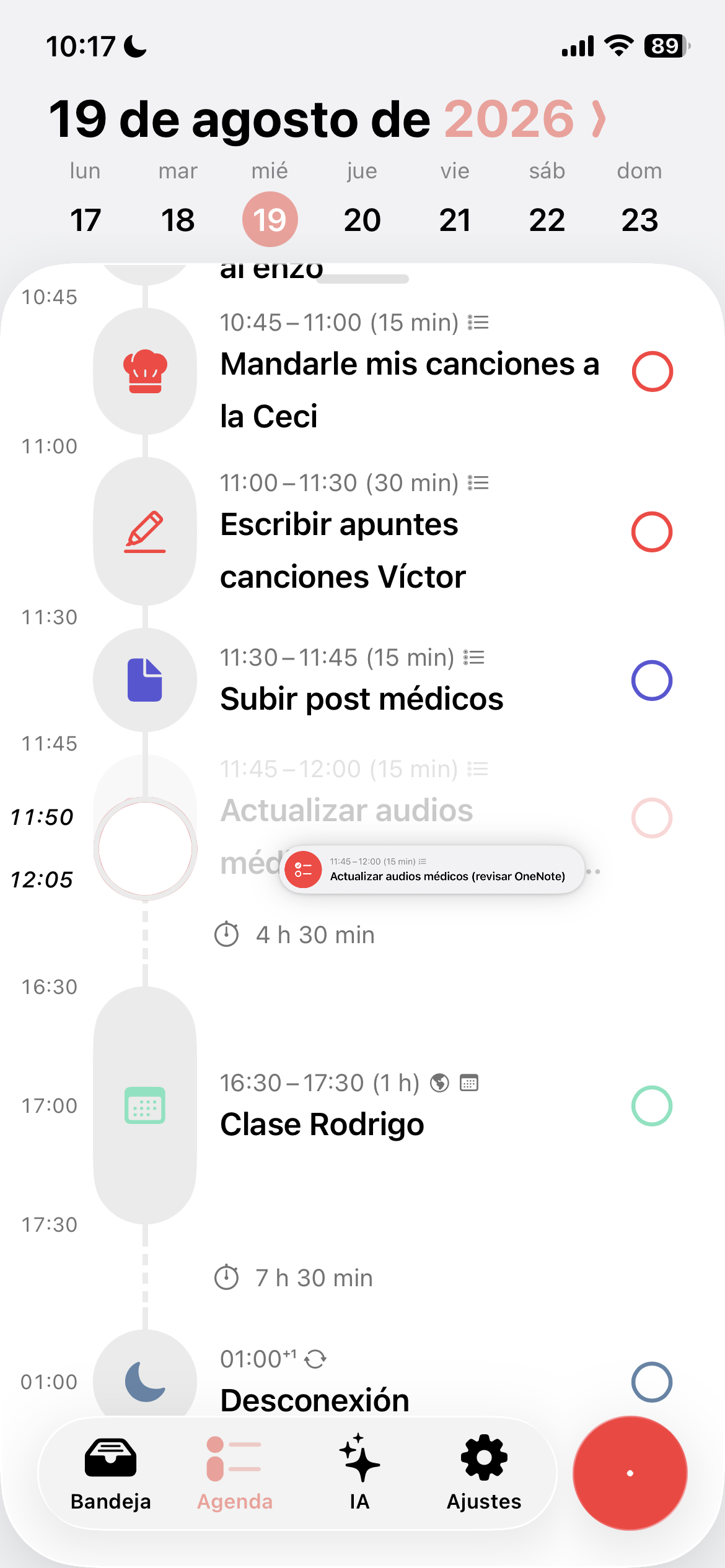
It’s so hard to move a task so it starts right before or after another one. For me it’s always frustrating. And I think the 5 min gaps doesn’t work for me, I always find myself sticking to quarters of hours.
Also when you have a lot of free hours between tasks it’s almost impossible to place a task where you want without having to manually open the task and configure the start time. I use a lot of Apple Reminders set for “Today”, so they appear at the top of the timeline and then I timeblock them, but I always find myself struggling to do this process.
I have 3 solutions for this:
Define a minimum time gap in the options, so the app adapts to different users in this context. Maybe someone just likes to use 30 min durations and time gaps, etc. I like 15 min for example.
Make the intervals/time gaps in the timeline sensitive to the position of the dragged task relative to the horizontal (x) position of the dragged element. The closer to the left the item (task) is dragged, the smaller the time units will be (5 min, 10 min). And the closer to the right, the time units will be bigger (30 min, 1 hour)
When dragging a task, the timeline becomes this cleaner version divided by blocks of time of the same size, so it doesn’t feel inconsistent, making it harder to miss the right place to timeblock a task.
I hope I made myself clear, English is not my main language :)
Thanks in advance
Status: Inbox
Log in to comment and vote
No comments yet
Be the first to share your thoughts.